Powershell command:
,@(git branch | Select-String -Pattern "[^(*?)\s? master]") | ForEach-Object{$_.Line.Trim()} | %{git branch -D $_}
Powershell command:
,@(git branch | Select-String -Pattern "[^(*?)\s? master]") | ForEach-Object{$_.Line.Trim()} | %{git branch -D $_}
Fellow suggests the following 10 measures for engineering metrics. I agree some of them. Let me add my opinon in line. My opinion is based on current company situation that it releases every three months.
Lead time: Yes. It means from the time of customer request to the time of deployment in production.
Cycle time: Yes. It means from the time of staring of the developmnet to the time of deployment in production. However I would like to mearsure to the time of master branch merge.
Number of story points: Yes. I prefer to measure number of stories. Because story points are decided by engineers and it's not correct until the team gets stable. It takes about 1 or 2 years. The problem is after 1 or 2 years, engineers are not in the team.
Mean time to restore in production: No. Dev and Ops are separated.
Days worked: Yes, but no. The formula of the productivity is output / input. We can use this as input. The challenge is engineers are in several countries. It's little bit hard to calculate work days with holidays of each country.
Context switching: No. There is no way to measure it objectively.
Deploy frequency: No. It should be YES, however current my company has fixed release cycle.
Change failure rate: Yes. I use this measure like defect count / total count of story and defect.
Rework ratio: No. There is no way to measure it objectively.
WIP balance: No. I don't want to measure the process. I prefer to measure the result.
https://fellow.app/blog/productivity/engineering-metrics-what-they-are-ways-to-measure-them/
I had moved to the sub module directory and run the following Gradle command.
gradle build
Now I build it in the paraten directory.
gradle :sub-module:build
미국, 캘리포니아에 온 지 6개월 인 사람이 생각한 미국에 도착 후 할 일을 순서대로 나열 합니다.
0. 집: 미국 오기 전 https://www.theblueground.com/ 에서 3개월 살 집을 미리 구하시는 걸 추천합니다. 집 주소가 없으면 은행 계좌, 운전 면허을 받을 수 가 없습니다.
1. 전화: Target에서 Mint Mobile sim card prepaid $60 구입. 도착 당일 혹은 다음 날 바로 사세요. 밖에서 인터넷을 쓸 수 있으며 통화 무제한이므로 이후 볼 일 볼 때 큰 도움이 됩니다.
2. Social Security Number: 미국 내 주소가 없어서 안 하고 있었는데 은행 계좌 만들 때 필요하고 발급 받는데 2주까지 걸린다고 해서 회사 주소로 신청. 온라인으로 신청하고 여권, I-94(가장 최근의 출입국 기록), I-129S 챙겨서 그날 바로 Social Security Office 방문하니 간단히 끝남. 미국 도착 후 2일 째 하십시오. I-94가 반영되는데 하루가 걸린다고 합니다.
3. 집: 저는 미국에 오기 전에 회사에서 소개 시켜 준 Relocity라는 서비스를 사용했는데 최악임. 7월 초 미팅을 가지고 7월 중순부터 집 찾기로 해서 7월 말 후보 집들 몇 개 보내준다고 하더니 8월 중순부터 시작. 약속한 후보 집들 동영상 다 보내 주지도 않음. 첫 집만 보내주고 끝. 공항 근처라 소음은 어떠냐고 물어보니 대답 없음. 답답해서 Zillow에서 직접 집을 찾아 여기 내가 8월 말에 도착할 때까지 계약 끝내도록 했더니 8월 말까지 그 아파트 좋다라고 함. 그래서 신청은? 이러니 매니저한테 설명했으니 온라인으로 신청하라고 함. 8월 30일. 신청하고 이틀이 지나도 연락이 없어 아파트 매니저한테 전화했더니 신청 요금 아직 안 내서 심사 안 하고 있는데 이럼. 카드로 지불 했는데 그게 왜 지불이 안되냐고 따지고 확인하라고 했더니. 수입은 증명 됐으니 여권과 일본 은행 거래명세서(bank statement) 내라고 함. 거래명세서 발급 받는데 며칠 걸린다고 하니 지 퇴근 시간이라며 빨리 끊으라 그럼. 아 놔.
호텔에 머물다가 0번에 소개한 사이트에서 3개월 지낼 집을 구함. 3개월치 월세를 한번에 지불하므로 몫돈이 필요함.
4. 은행 계좌: 일본에서 union bank 계좌를 만들었지만, 결국 집과 SSN을 해결하고 Bank of America에서 만듬. Chase는 운전 면허증이 없으면 안 된다고 함.
5. 자동차: 캘리포니아 운전 면허증이 없어도 구매 가능. 하지만 대출 이자가 비싸 일시불로 살 수 있는 중고차를 구입. 딜러가 필요한 서류나 절차를 다 해 줌. 신용카드로 $5,000 까지만 지불 가능하고, 계좌 이체도 하루 $7,000 이 한도라 2번에 나눠서 이체함.
6. 운전 면허증: 사실 집을 구하고 바로 취득할 수 있었으나 운전 학원 차를 빌려서 시험을 치러야 했기에, 돈이 들어서 차를 구매하고 운전 면허 실기 시험을 침. 필기는 집과 SSN이 나오고 바로 신청해서 합격 했음.
7. 집 구하기: 다시 집 구하기. 가족과 함께 살 집을 https://www.zillow.com/ 에서 집을 몇 군데 보고 구함. 아직 credit score가 없어서 구하기 힘들었지만 운 좋게 좋은 집 주인을 만나 일반 주택을 구함. 대신 일반 계약 기간이 1년임에 비해 1년 7개월로 길게 계약.
8. 애들 학교: Elementary, Middle School은 다 같은 학군(District)라서 같은 학군 홈페이지에서 애들을 등록함. 등록에 필요한 서류들은 집 주소가 확인 가능한 집 계약서, 수도나 전기 요금서, Bank statement 등의 서류, 여권, 영어 예방 접정 기록 그리고 TB(결핵) Test 결과가 필요. TB Test 결과 없이 일단 온라인으로 등록 후 학교와 연락을 주고 받아 애들이 미국 입국 후 TB Test를 해서 각 학교 담당자에게 보내고 난 후에 학교 등교일을 확정 받음.
9. 예방 접종: 캘리포니아에서 요구하는 예방접종 종류와 횟수가 더 많아 학교 입학 후 병원을 예약하여 추가로 접종을 해야 함. 학교에서 의사와 상의하여 추가로 맞추라고 해서 했는데 예약이 2달 후가 됨. 막상 병원에 가니 바로 접종은 안 되고, 다시 예약하고 나중에 다시 와야 함. 아직 끝나지 않았지만 병원을 4번 방문. 학교 담당자에게 부탁해서 추가 접종이 필요한 백신과 횟수를 확인한 후 CVS minute clinic에서 맞추면 더 빨리 끝낼 수 하다.
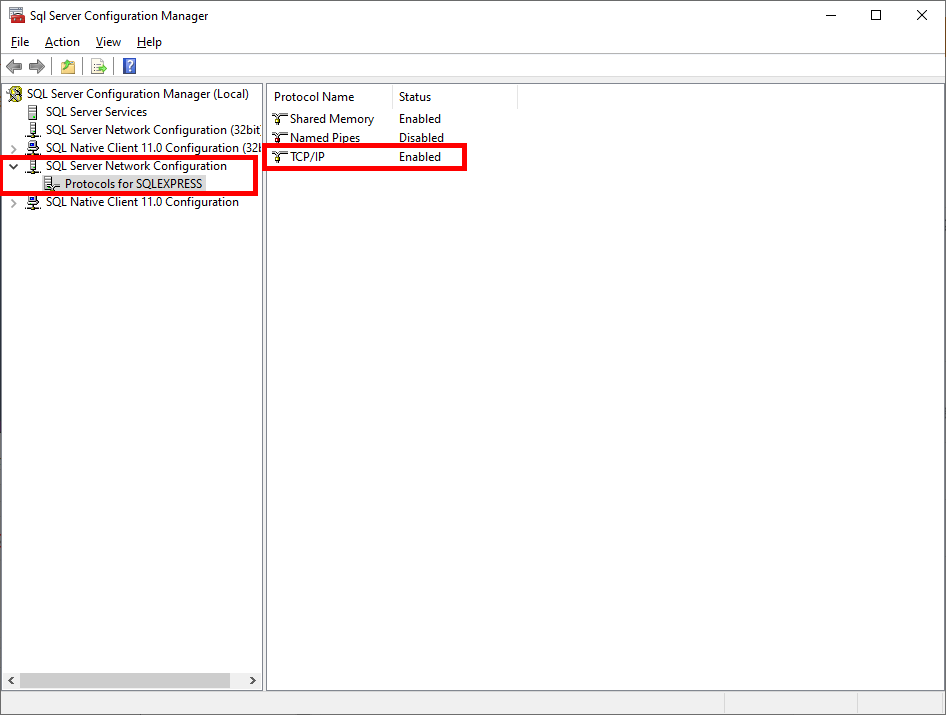
This is caused by not having the SQL Server Authentication configured properly. SQL Server authentication is off by default.
Here is the solution.



1. Rating Report: "On a scale of 1-10, how are you feeling professionally, and on a scale of 1-10, how are you feeling personally?" This question makes you know your direct report's status.
2. Meaningful Accomplishment: "Since the last time we met, what has been your most meaningful accomplishment?" It provides a chance of the sharing of the win. It might be unknown accomplishment.
3. Biggest Roadblock: "What is your biggest roadblock right now?" One of manager's responsibilities is to eliminate the roadblock that blocks your direct report's success wasy.
4. Commitment Check: "Please report on your commitments from our last meeting" Manager and direct report should share the progress of action items from last meeting.
5. Focus Work: "What priority, project, or problem whould yo ulike to focus on today?" Manager and direct report can have brainstorming or discussion for next step.
6. Commitment List: "Here are the agreed upon commitments from today" Share action items that are should be checked next 1 on 1.
From Colleen Hauk Improving Your Leadership Communications
아래는 미국 L1 비자를 위해 준비했던 문서들입니다. 정확히는 L1 blanket 승인입니다.
이상의 서류들을 제출하고 3개월 후 드디어 아래의 서류들이 도착했습니다.
비자 심사 결과는 일주일 후 연락이 오는데 수령은 대사관이 아닌 외부 업체를 찾아가야 합니다. 택배 수령은 한 사람당 3000엔이 넘어서 직접 찾아갔습니다. 서류 준비 부터 비자 받기까지 총 5개월이 걸렸습니다.
多くの未上場外資系は税制非適格ストック・オプションに該当すると思います。
税制非適格ストック・オプションを権利行使(exercise)した場合、給与所得として所得税の対象になります。※1
例えば令和3年(2021年)下記のように行使した場合、115,000円の追加所得になります。
1000 Grant
800 Vest
500 Exercise
$5 Exercise price
$7 FMV(Fair Market Value) ※3
115円 行使日のTTM(Telegraphic Transfer Middle Rate) ※4
追加所得の計算
(7 - 5) * 500 * 115 = 115,000円
国税庁のページにも下記のように計算式があります。USDベースの株価なので為替計算が必要です。※1, ※2
(権利行使時株価 - 権利行使価格) × 株式数 = 所得金額
所得税額は所得税率によって変わりますが、年収1,000万だと多分23%になると思います。
115,000 * 0.23 = 26,450円が追加で支払う所得税になります。
令和3年の確定申告下記のリンクから作成できます。
https://www.keisan.nta.go.jp/kyoutu/ky/sm/top#bsctrl


※1. https://www.nta.go.jp/taxes/shiraberu/taxanswer/shotoku/1543.htm
※2. https://www.keisan.nta.go.jp/r3yokuaru/ocat2/ocat21/cid477.html
※3. FMVは会社に問い合わせするかCarta等のExercise recordに行使時の価格が表示されます。

It's new year resolutions for the first time in 10 years. Here is previous one.
Before to set resolutions, I would like to look back 2021. Every year I have 2 major goals, losing my weight and reading a book/month. Yes, I missed them every year. That's why I have them every time. But the miracle ocurred in 2021. I lost 12Kg, lost 18kg but the weight is recovering. And I read 17 books. Working From Home made it!
I would like to upgrade my resolutions like below.
1. Touch 69.9Kg and Keep the weight under 72Kg. Must loose 15.4Kg from Jan. 4th 2022
2. Write a book review post per month.
3. Make strong body that I can work for 24 hours without the break.
4. Be an expert of "Automation".
5. Make a fun a week.
I got the following error when I build my project.
> Could not find method compile() for arguments [org.slf4j:slf4j-api:1.7.24] on object of type org.gradle.api.internal.artifacts.dsl.dependencies.DefaultDependencyHandler.
Here is a part of build.gradle
compile 'org.slf4j:slf4j-api:1.7.24'
compile 'org.slf4j:slf4j-simple:1.7.24'
I found the anwer https://stackoverflow.com/questions/23796404/could-not-find-method-compile-for-arguments-gradle.
From gradle 7.0 compile, runtime, testCompile, testRuntime are changed to implementation, runtimeOnly, testImplementation, testRuntimeOnly.
After I changed to implementation, my project is built successfully.
implementation 'org.slf4j:slf4j-api:1.7.24'
implementation 'org.slf4j:slf4j-simple:1.7.24'
netstat -ano -p tcp | find "80"
netstat is a command to display TCP connections and port.
-a Displays all active TCP connections and the TCP and UDP ports on which the computer is listening.
-n Displays active TCP connections, however, addresses and port numbers are expressed numerically and no attempt is made to determine names.
-o Displays active TCP connections and includes the process ID (PID) for each connection. You can find the application based on the PID on the Processes tab in Windows Task Manager. This parameter can be combined with -a, -n, and -p.
-p Shows connections for the protocol specified by Protocol. In this case, the Protocol can be tcp, udp, tcpv6, or udpv6. If this parameter is used with -s to display statistics by protocol, Protocol can be tcp, udp, icmp, ip, tcpv6, udpv6, icmpv6, or ipv6.
https://docs.microsoft.com/en-us/windows-server/administration/windows-commands/netstat
find is a command to search a string of text
1. windows key and type "cmd"
2. Choose "command prompt" with "run as administrator"


Run PowerShell
tail -f
Get-Content -Path C:\MyLogs\mylog.log -Wait -Tail 100
tail -f | grep
Get-Content -Path C:\MyLogs\mylog.log -Wait -Tail 100 | Select-String "Search Word"
If you search "traefik log file path setting" in Google. The following 2 URLs are top.
https://doc.traefik.io/traefik/observability/logs/
https://doc.traefik.io/traefik/v1.7/configuration/logs/
I was confused. Because first URL shows the following example.
[log]
filePath="/MyLogs/traefik.log"
format = "json"
level = "DEBUG"
And second URL shows the following example. But it doesn't work with Traefik version 2.2
logLevel = "DEBUG"
[traefikLog]
filePath="/MyLogs//traefikLog.log"
Here is my traefik.toml for Traefik version 2.2. I found the reason of 404.
[log]
filePath="/MyLogs/traefik.log"
format = "json"
level = "DEBUG"
[accessLog]
filePath="/MyLogs//traefikAccess.log"
mvn clean packageYou can see the report in ${your_project_root_directory}/target/site/jacoco/index.html
If your project already defines VM arguments for test execution, be sure that they will include property defined by JaCoCo.
One of the ways to do this in case of maven-surefire-plugin - is to use syntax for late property evaluation:
org.apache.maven.plugins
maven-surefire-plugin
@{argLine} -your -extra -arguments
Here is my real configuration pom.xml

